
W A V E Y

Coming Soon HTML5 Template

Documentation

Welcome to our template documentation! This guide provides everything you need to quickly set up and customize your website. Designed for all skill levels, it’s your go-to resource for creating a professional site with ease. Let’s get started!
Advanced Features

Intro

The Wavey Coming Soon Template is a cutting-edge, feature-rich solution designed for professionals who require a robust, secure, and efficient Coming Soon Template. Built with modern web technologies, this template seamlessly integrates advanced JavaScript OOP, PHP, and email handling for an exceptional user experience.

Advanced Features & Technologies

  • JavaScript Object-Oriented Programming (OOP):
    Structured and modular JavaScript OOP implementation for scalability and maintainability.
  • JSDoc Documentation:
    Comprehensive JSDoc integration to provide clear and professional documentation.
  • Professional PHP Subscription Form:
    Fully functional subscription system that securely stores user emails.
  • Professional PHP Contact Form:
    Secure contact form with email handling using PHPMailer.
  • HTML Email Template Feature:
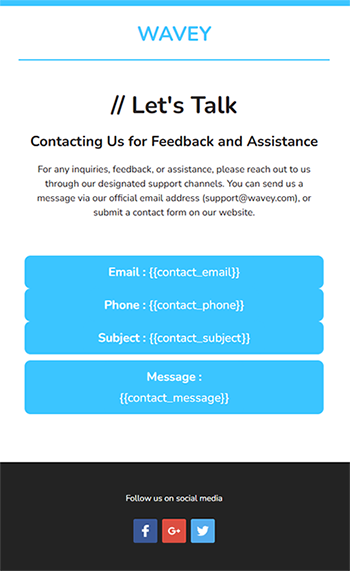
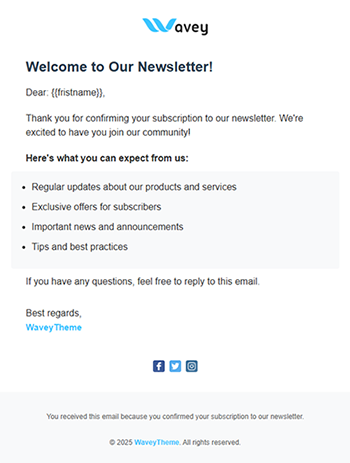
    Integrated responsive email templates for both subscription & contact forms.
  • Logging Feature with Timestamp:
    Integrated logging mechanism to track form submissions, errors, and system events.
  • .env Configuration File:
    Enhances security & portability by keeping sensitive data out of the source code.
  • PHP Test Files for Configuration Validation:
    A suite of individual PHP test files to verify system configurations before deployment.

Wavey Coming Soon

With its scalability, security, and ease of maintenance, the Wavey Coming Soon Template is not just a basic Coming Soon template — it’s a professional-grade solution designed for businesses and developers who demand excellence in every aspect of web development.

JavaScript Object-Oriented Programming (OOP)

Wavey Coming Soon Template. isn't just a placeholder – it's a powerful foundation for your future website, built with modern web development practices in mind. Beyond a visually stunning design, we've focused on creating a robust and maintainable codebase, leveraging the principles of JavaScript Object-Oriented Programming (OOP) to deliver a truly professional and scalable solution.

Key Features:

  • Modular Code:
    JavaScript classes and modules break down functionality into reusable components. Each class encapsulates its own logic, making the codebase easier to debug and extend.
  • Encapsulation:
    Data and methods are grouped within classes, reducing global namespace pollution and improving code organization.
  • Inheritance:
    Classes can inherit properties and methods from parent classes, promoting code reuse and reducing redundancy.
  • Event-Driven Architecture:
    Classes are designed to handle specific events (e.g., form submission, modal opening), ensuring clean separation of concerns.
  • Professional Debugging:
    Well-structured OOP code makes it easier to trace errors and debug issues, as each class has a clear responsibility.

How It Works in the Template

The template uses JavaScript OOP to manage key functionalities such as:
  • Preloader Animation
  • Form Validation
  • Modal Management
  • Event Handling

Example Class Structure:

class WtAppEffects {
constructor() {
this.initializeEffects();
}

initializeEffects() {
this.initWaterpipe();
/**-------------- Rest of the codes  ----------- */
}

initWaterpipe() {
if (typeof $.fn.waterpipe === 'function') {
this.smokyBG = $("#bg-wrapper").waterpipe({
gradientStart: "#fa05fa",
gradientEnd: "#6b71e3",
smokeOpacity: 0.1,
/**-------------- Rest of the codes  ----------- */
});
}
}

initSnowEffect() {
if (typeof $.fn.letItSnow === 'function') {
this.snowEffect = $('.let-it-snow').letItSnow({
/**-------------- Rest of the codes  ----------- */
});
}
}

initRipples() {
if (typeof $.fn.ripples === 'function') {
/**-------------- Rest of the codes ----------- */
}
}

initSparkAnimation() {
if (typeof $.fn.sparkAnimation === 'function') {
this.sparkEffect = $('#sparks').sparkAnimation({
amount: 3000,
speed: 0.08
});
}
}
}

JSDoc Integration

Wavey Coming Soon Template is a developer-friendly springboard for your future website. We've incorporated best practices and advanced features, including comprehensive JSDoc documentation, to streamline your development process and ensure a smooth transition from Coming Soon to Live.

Key Features:

  • Well-Documented Code with JSDoc:
    Dive into a codebase that's easy to understand and maintain, thanks to integrated JSDoc documentation. This industry-standard approach provides clear explanations of classes, methods, properties, and parameters, saving you valuable time and effort during customization and future development.

How It Works in the Template

The template uses JSDoc to document key JavaScript components, such as:
  • Classes : Descriptions of class purpose, properties, and methods.
  • Functions : Details about parameters, return values, and usage examples.
  • Events : Documentation for custom events and their triggers.

Example Class Structure With JSDoc:

(function ($) {
"use strict";
/**
* @class WebsiteCore
* @description Core class for managing website functionalities, including device control, ...............
*/
class WebsiteCore {

/**
* @constructor
* @description Initializes the WebsiteCore instance, sets up configuration, and caches DOM elements.
*/
constructor() {
/**
* @property {object} CONFIG - Configuration settings for breakpoints, scroll threshold, and preloader delay.
* @property {object} CONFIG.BREAKPOINTS - Breakpoints for different device sizes.
* @property {number} CONFIG.SCROLL_THRESHOLD - Scroll threshold for header visibility.
* @property {number} CONFIG.PRELOADER_DELAY - Delay for preloader fadeout.
*/
this.CONFIG = {
BREAKPOINTS: {
    DESKTOP: 992,
    TABLET: 768
},
SCROLL_THRESHOLD: 300,
PRELOADER_DELAY: 3000
};

/**-------------- Rest of the codes ----------- */
}
}
})(jQuery);

PHP Forms

PHP Contact Form

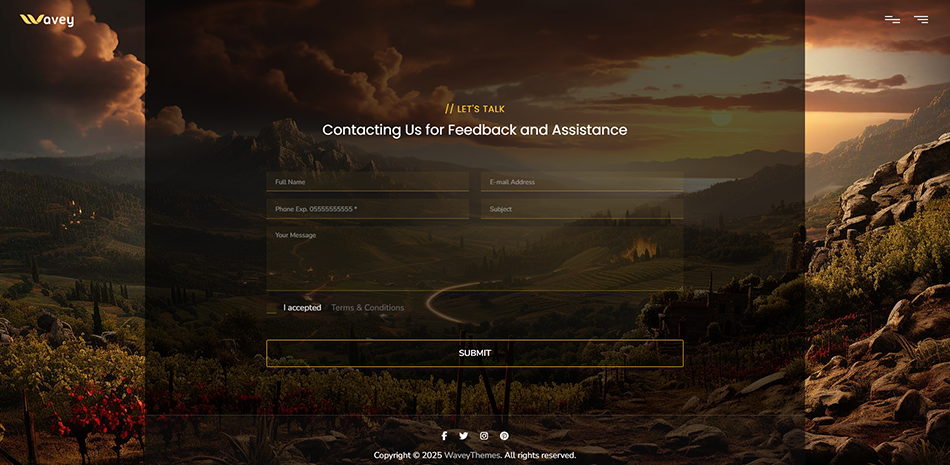
Wavey Contact Form is a modern and attractive design for the form to capture users' attention and encourage them to use it. Our integrated contact form provides a hassle-free way for visitors to get in touch. Customize emails , validation rules, and submission handling to meet your exact data collection needs.

contact form img

Key Features:

  • Robust Validation:
    Client-side validation ensures data accuracy and reduces invalid submissions.
  • Seamless Submission:
    Configure form submission to integrate with your preferred backend solution.
  • Automated Responses:
    Set up automated email replies to acknowledge inquiries and manage expectations.
  • Spam Protection:
    Implement measures to minimize spam submissions and maintain a clean inbox.

How It Works in the Template

The template's contact form is designed for easy integration and customization. Key aspects are controlled through configuration options, allowing you to:
  • Define form fields and their properties (e.g., labels, input types, required status).
  • Specify validation rules for each field (e.g., email format, minimum length).
  • Configure the form submission endpoint and processing logic.
  • Customize success and error messages for user feedback.

Example Contact Form Structure:

<form id="wt-contact__form">
<div class="row">
<div class="col-lg-6 col-md-6">
<input type="text" class="form-control shadow-none mb-15" name="contact_name" id="contactName" placeholder="Full Name" />
</div>
<div class="col-lg-6 col-md-6">
<input type="text" class="form-control shadow-none mb-15" name="contact_email" id="contactEmail" placeholder="E-mail Address" />
</div>
<div class="col-lg-6 col-md-6">
<input type="text" class="form-control shadow-none mb-15" name="contact_phone" id="contactPhone" placeholder="Phone Exp. 05555555555 *" />
</div>
<div class="col-lg-6 col-md-6">
<input type="text" class="form-control shadow-none mb-15" name="contact_subject" id="contactSubject" placeholder="Subject" />
</div>
<div class="col-lg-12 col-md-12">
<textarea class="form-control shadow-none mb-20" name="contact_message" id="contactMessage" placeholder="Your Message" cols="30" rows="5"></textarea>
</div>
<div class="col-lg-12 col-md-12">
<input type="checkbox" class="form-check-input mr-10" id="termsCheckBox" value="" />
<span>I accepted <a class="ml-15" href="#" data-bs-toggle="modal" data-bs-target="#wt-modal__terms" id="termssToggle">Terms & Conditions</a></span>
</div>
<div class="col-lg-12 col-md-12 mt-20">
<button type="submit" name="submit" class="wt-btn wt-btn--outline wt-btn--effect-02 z-index-1 wt-submit--style01">
Submit
</button>
</div>
</div>
</form>

PHP Subscription Form

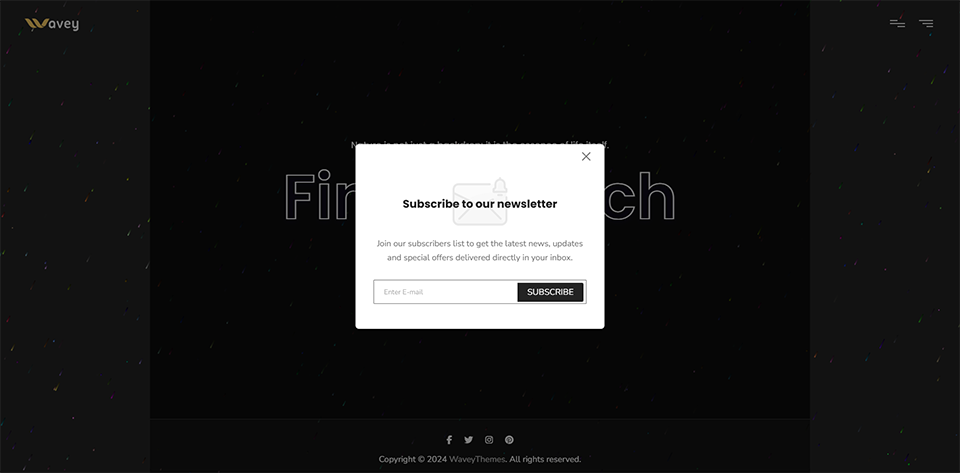
Wavey Contact Form Soon Template is designed with modern, professional features to ensure functionality, security, and ease of use. One of the standout features is the PHP Subscription Form, which provides a robust and secure way for users to subscribe to your newsletter or updates. Below is a detailed explanation of this feature and how to customize it:

contact form img

Key Features:

  • Server-Side Validation:
    Ensures all form inputs are valid before processing (e.g., valid email format, required fields). Prevents malicious or incomplete submissions.
  • Email Confirmation:
    Subscribers receive a confirmation email with a unique token to prevent spam and ensure valid email addresses.
  • Welcome Email:
    Subscribers receive a Welcome email after confirmation is successful.
  • Dual Storage:
    Subscriptions are saved to both your local MySQL database and Mailchimp (configurable via .env).
  • Anti-Spam Measures:
    Built-in CSRF tokens and input sanitization to protect against spam and malicious attacks.
  • User Feedback:
    Displays success or error messages to users after form submission.
  • Security:
    Sanitizes and validates all inputs to prevent SQL injection and XSS attacks. Uses secure tokens for email confirmation links.

How It Works in the Template

The PHP Subscription Form is integrated into the template with the following components:
  • Front-End Form: HTML form with fields for email (and optionally name).
  • Email Confirmation: Sends a confirmation email with a unique token to verify the subscriber's email address.
  • Database Integration: Subscriptions are logged in the subscribers table.
  • Mailchimp Integration: Subscriptions are synced with Mailchimp (optional).

Example Subscription Form Structure:

<?php
session_start();

require __DIR__ . '/../vendor/autoload.php';
$config = require_once 'config/config.php';

// PHPMailer classes
use PHPMailer\PHPMailer\PHPMailer;
use PHPMailer\PHPMailer\Exception;


function logDebug($message)
{
$logDir = __DIR__ . '/logs';
// Create logs directory if it doesn't exist
if (!file_exists($logDir)) {
mkdir($logDir, 0755, true); // 0755 permissions (adjust if needed)
}

$logFile = $logDir . '/sub-debug.log';
$timestamp = date('Y-m-d H:i:s');
file_put_contents($logFile, "[{$timestamp}] {$message}\n", FILE_APPEND);
}

if (!$config) {
logDebug("Configuration file error");
echo json_encode(['status' => 'error', 'message' => 'Configuration file not found or invalid.']);
exit();
}

Logging & Trace

Logging with Timestamps

Wavey Coming Soon Template is crafted with contemporary, professional attributes that prioritize security, traceability, and simplified debugging. A key highlight of this template is the Security & Trace: Logging with Timestamps functionality, which offers a comprehensive system for monitoring events, errors, and user activities. Below, you will find an in-depth overview of this feature and instructions on how to tailor it to your needs:

Key Features:

  • Timestamped Logs:
    Automatically records the date and time of each event, making it easy to trace issues and monitor system activity.
  • File-Based Logs:
    Stores logs in a dedicated directory (e.g., logs/ ) with separate files for different types of logs (e.g., debug.log , error.log ).
  • Customizable Log Levels:
    Supports different log levels (e.g., debug , info , error ) to categorize and prioritize log messages.
  • Security Monitoring:
    Logs suspicious activities (e.g., failed login attempts , invalid form submissions ) for security auditing.
  • Ease of Debugging:
    Provides detailed logs to help developers identify and resolve issues quickly.

How It Works in the Template

The Logging with Timestamps feature is integrated into the template with the following components:
  • Logging Function:
    Logs are stored in the logs/ directory, which is automatically created if it doesn’t exist.
  • Logging Function:
    A reusable logDebug function writes messages to a log file with a timestamp.
  • Log Files:
    Separate log files (e.g., sub-debug.log , error.log ) are used for different types of logs.

Example Logging with Timestamps File:

[2025-02-08 10:40:51] New pending subscription: example01@waveytheme.com 
[2025-02-08 10:40:53] Confirmation email sent to: example01@waveytheme.com 
[2025-02-08 10:40:53] Subscription process completed successfully for: example01@waveytheme.com 
[2025-02-08 10:41:13] New pending subscription: example02@waveytheme.com  
[2025-02-08 10:41:15] Confirmation email sent to: example02@waveytheme.com  
[2025-02-08 10:41:15] Subscription process completed successfully for: example02@waveytheme.com  
[2025-02-08 10:41:22] Received Token: 1c7461d0a91dec60c8eb4a36568831b4e17abfe0f0fde216ac2b56f8aa31d26d  
[2025-02-08 10:41:22] Total Pending Subscribers: 2  
[2025-02-08 10:41:22] Matched Subscriber: example02@waveytheme.com  
[2025-02-08 10:41:22] Subscriber example02@waveytheme.com confirmed  
[2025-02-08 10:41:25] Welcome email sent successfully to: example02@waveytheme.com  
[2025-02-08 10:41:26] Mailchimp sync failed: 400: example02@waveytheme.com is already a list member. Use PUT to insert or update list members.  
[2025-02-08 11:09:16] New pending subscription: example02@waveytheme.com  
[2025-02-08 11:09:18] Confirmation email sent to: example02@waveytheme.com  
[2025-02-08 11:09:18] Subscription process completed successfully for: example02@waveytheme.com  

PHP Test Files

PHP Test Files

Wavey Coming Soon includes a suite of advanced PHP test files designed to enhance your development process, ensuring robust functionality and seamless integration. These test files serve as essential tools for validating various aspects of your application, allowing for efficient troubleshooting and optimization. Below is a summary of each test file and its significance:

Key Features:

  • Environment Variables Test: test-env.php
    Ensures that environment variables are correctly loaded from the .env file.
  • Composer Autoloader Test: test-composer.php
    Verifies that Composer dependencies are correctly autoloaded and available for use.
  • Database Connection Test: test-database.php
    Tests the connection to your MySQL database using credentials from the .env file.
  • SMTP Connection Test: test-smtp-connection.php
    Validates SMTP settings (e.g., host, port, username, password) by sending a test email.
  • Mailchimp API Test: test-mailchimp-api.php
    Tests the integration with the Mailchimp API using your API key and list ID.

How It Works in the Template

The PHP Test Files are integrated into the template with the following components:
  • Test Scripts: Standalone PHP files located in the tests/ directory.
  • Configuration: Uses environment variables from the .env file for testing.
  • Feedback: Outputs success or error messages to the console or browser.

Example test-composer.php File:

<?php
/**
* Composer autoloader and PHPMailer test.
* This code is used to test the Composer configuration settings for the application.
*/
require __DIR__ . '/../vendor/autoload.php';

// Test PHPMailer
$mail = new PHPMailer\PHPMailer\PHPMailer(true);
echo 'PHPMailer loaded successfully!<br>';

// Test Mailchimp
$MailChimp = new DrewM\MailChimp\MailChimp('your-api-key');
echo 'Mailchimp API loaded successfully!';